


Your games as cards. Your Switch's new HOME.
CardsNX replaces the Switch's HOME menu with big box-art cards. Discord, the Album, music, News and your homebrew are one button away, and your phone becomes a companion. Free and open source.
 Music
 Theme Shop
 Nextendo
 Reboot to Hekate
 Settings
 Sleep
Glass, Material 3, Soft or Snow.
Pick the look in Settings > Look, or from NXToggle: four styles and two layouts. With Halo the game you're on sits big in the middle, and the colours can follow its cover.
- GLASSDefaultYour games as big box-art cards on frosted glass, with play time and pages for Games, Homebrew, Nintendo and Media.
- M3Material 3A rail with your pages, round shapes and the colours of the game you've chosen.
- SOFTSoft and SnowSoft: one dark surface, raised and pressed in. Snow: black and white, nothing else.
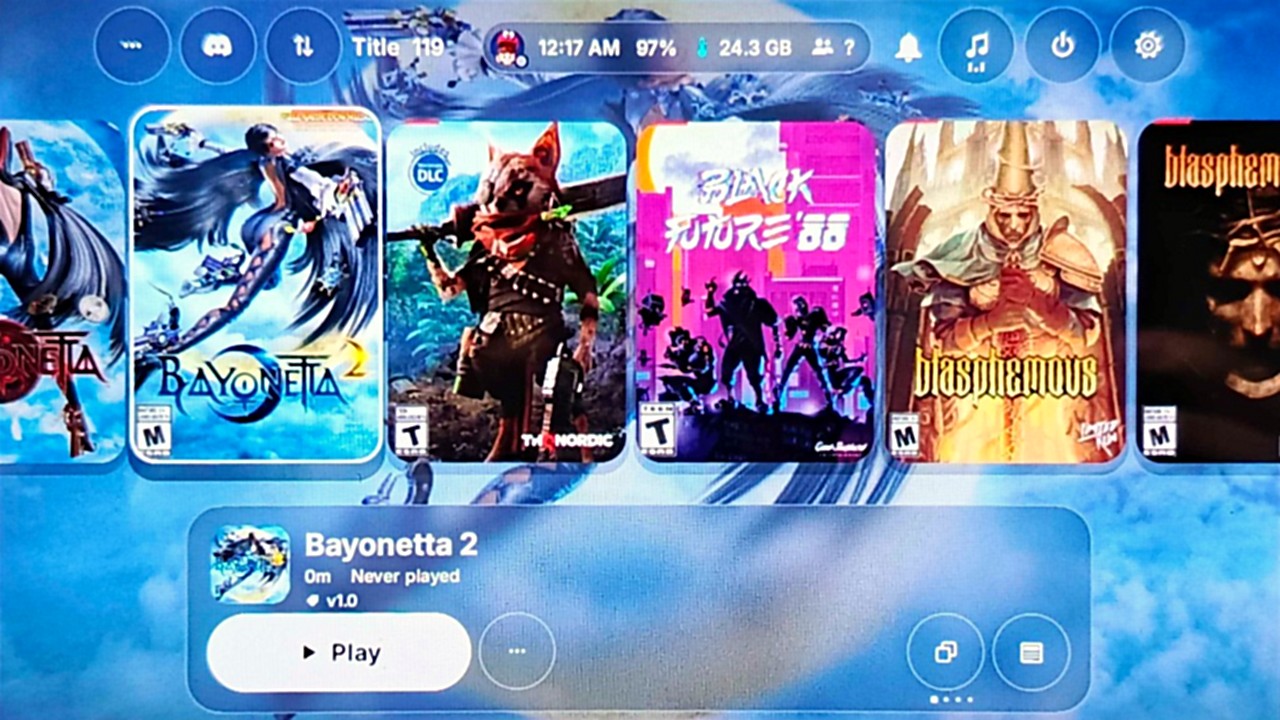
A HOME menu that does more.
- Discord in HOME, with your status showing what you play
- The Album with screenshots and videos, SD card or console memory
- Music player and YouTube Music
- Companion app on your phone: what's playing, battery, start a game
- Achievements with medals, points and a level
- Box art and title pictures from SteamGridDB and GameTDB
- Pages of your own for your collections
- News and your profile with friend codes
- Nextendo: who's playing online now
- Quick Settings and Reboot to Hekate
- Bug reports with your logs, sent from Settings
- Updates on the console with NXToggle
- Turn it off any time, no PC needed
On your SD card in a minute.
You need a Switch running Atmosphère. There's nothing to sign up for.
- Download the CardsNX zipFrom the latest GitHub release (HomeNX-full.zip).
- Extract it to the root of your SD cardIt adds
atmosphere/andswitch/folders. - Restart the consoleCardsNX is now your HOME menu.
- Change it from the SwitchOpen NXToggle from your homebrew menu to turn CardsNX off and on, pick its style and layout, or update it.
sdmc:/
├── atmosphere/contents/
│   └── 0100000000001000/   CardsNX as HOME
├── switch/
│   ├── SwitchU/            its files
│   ├── NXToggle/           on/off, look, updates
│   └── CardsNX/            CardsNX as an app
└── hbmenu.nro              the Loader
Two ways to run it.
Replaces the Switch's HOME menu. Launch games, open Sphaira as an application, and change the look, update or turn it off from the console.
Download CardsNXA normal .nro you open from Sphaira or hbmenu, to try it without changing anything.
If the console ever stops at a black screen, put the SD card in a computer and delete atmosphere/contents/0100000000001000. The normal HOME menu comes back.
Discord may flag accounts that use third-party clients; using it in CardsNX is at your own risk.

Make HOME yours.
Free, open source, and one zip away from your SD card.